Industries are undergoing rapid transformation driven by remote work, hybrid work, and complex workflows. Engineers, designers, architects, data scientists, researchers, and creators now need powerful tools that can keep up with rigorous performance and workflow requirements. These requirements are pushing businesses to rely on AI-driven solutions that will help users work smarter, move faster, and stay cost-effective, all while keeping up with growing performance demands and collaboration.
So how can businesses meet these changing demands head-on? This is where the “Lenovo Access” comes in. This next-generation, purpose-built solution supports high-performance remote workflows and simplifies the management of AI-optimized workstations.
What is Lenovo Access?
To support the fast deployment of high-performance remote workstations, Lenovo introduced its ready-made Lenovo Access solution. Designed to simplify and enhance remote workstation setups, Lenovo Access provides a secure, high-performance remote work experience without compromising user experience. This next-generation solution reflects Lenovo’s commitment to address the evolving needs of modern workflows. This is especially particular for industries requiring powerful graphic and computing capabilities in remote and hybrid environments.
Lenovo Access provides easily deployable blueprints with scalable and secure reference architectures, powered by advanced Lenovo Workstations. These solutions are further supported by superior hardware, software, and services. With the Lenovo Access Series, it represents a significant step forward for remote workstations, bringing high-performance tower and micro desktop-based solutions to a much broader audience, beyond those with specialist partners or in-house IT teams. So, what’s Lenovo Access’s first blueprint?
Lenovo Access: ThinkStation P3 Ultra SFF Blueprint
The first Lenovo Access Blueprint features the ThinkStation P3 Ultra SFF workstation in a configuration that includes seven systems neatly racked in a 5U shelf. Each system runs the Mechdyne TGX remote graphics protocol to support the performance and productivity of remote power users depending on centralized computing.
Additionally, each ThinkStation P3 Ultra SFF workstation delivers up to 5.7GHz turbo clock speeds with Intel Core Ultra processors, supports up to the NVIDIA RTX 4000 SFF Ada Generation GPU, and includes up to 128GB dual-channel memory and 16TB of storage. Lenovo also states that, unlike shared or virtualised servers, Lenovo Access offers 1:1 workstation access to the full CPU turbo performance of a workstation. It also provides access to real-time, responsive screen and control sharing for design reviews and training.
Overall, the Lenovo Access Blueprints enable low latency remote access to high-performance workstations from anywhere, on virtually any device. Users can improve productivity, enhance collaboration, and completely transform their remote work experience. Compared to the public cloud or virtual desktop infrastructure (VDI) services, Lenovo claims that the Lenovo Access offers superior performance and more seamless user experience. Check out the Lenovo Access ThinkStation P3 Ultra SFF Blueprint in AR here.
RackSolutions and Lenovo: Powering Next-Gen Workflows
In collaboration with Lenovo, the first Lenovo Access blueprint is built on RackSolutions’ custom-designed HyperShelf. Engineered to support seven ThinkStation P3 Ultra SFF workstations, this 5U rack-mounted solution offers a compact, cost-effective alternative to traditional workstation deployments.
The 5U HyperShelf for 7 Lenovo ThinkStation P3 Ultras maintains full access to power buttons and peripheral ports while optimizing airflow and thermal performance, ensuring long-term reliability. Ultimately, this configuration delivers flexible, secure, and space-efficient performance tailored for dynamic remote and hybrid work environments.
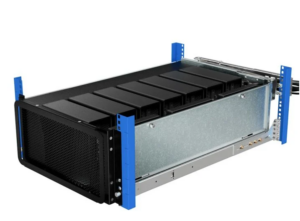
With the HyperShelf featured in Lenovo’s first blueprint, this marks the start of a planned series of curated industry solutions aimed at transforming workstations to meet the specific workflows of high-performance users. Lenovo’s blueprints bring together best-in-class technologies that enable innovative solutions to customer challenges. We’re proud to have played an integral role in the ThinkStation P3 Ultra SFF blueprint for Lenovo Access!
RackSolutions HyperShelf Key Benefits
The RackSolutions HyperShelf offers a range of key benefits designed to meet the needs of high-performance, space-conscious deployments.
- High-density machine deployment
- Provides optimal airflow through the system
- Easy serviceability and maintenance
- Scalability of the shelf design
- Cost to deploy or economics of using a Hypershelf
To learn more about our custom HyperShelf and collaboration with Lenovo, check out our blog here.
Custom HyperShelf Solutions for Unique Deployments
RackSolutions offers ready-to-order HyperShelves and rack accessories designed to efficiently support your computing devices in enterprise deployments and hyperscale data center environments. With high-quality in-house manufacturing, you can count on receiving the best HyperShelf available.
If you don’t see a HyperShelf that’s compatible with your devices, our engineers can develop custom solutions that go beyond standard workstations. Contact our sales team to learn more about custom HyperShelf options!
FAQs: Lenovo ThinkStation P3 Ultras HyperShelf
What is a HyperShelf and why do I need one?
To learn more about our HyperShelf Product Line and how you can scale smarter, check out our RackSolutions HyperShelf White Paper. In our HyperShelf Technical White Paper, you’ll learn how to redefine the workspace to support the rise of remote work, high-density PC mounting strategies to save space and money, and ways to achieve 40% more CPU core capacity without expanding your footprint (numerical findings and performance outcomes are based on an internal case study).
How do I manage airflow in the HyperShelf?
Our HyperShelves feature integrated airflow for optimal cooling and thermal efficiency. The intake and exhaust separates hot and cold air from mixing, which increases airflow and cooling capacity.
Are fans included with the HyperShelf?
Yes, exhaust fans are included with the 5U HyperShelf for 7 Lenovo ThinkStation P3 Ultras.
Are side panels removable on the HyperShelf?
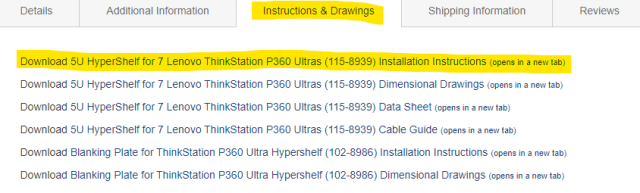
The removable side panels are held in place by use of captive screws. For exact removal steps, refer to the installation instructions found in the delivered kit or on the model’s webpage under the “Instructions & Drawings” tab.
Is there thermal testing data?
Yes, we provide in-house thermal testing data for our Lenovo ThinkStation P360 Ultras HyperShelf (115-8939). HyperShelf projects in the future will undergo in-house thermal testing if requested and if equipment availability allows.
Is there a cabling diagram?
Yes, we provide the Lenovo ThinkStation P360 Ultras HyperShelf (115-8939) cable guide here.